
The rules of proof
A criterion is proven when one piece of evidence for it has passed the app’s checks and has been accepted. These rules say who can accept what, as the app applies them.
Who can review
- Anyone who may edit a work item can review the evidence on it. The app has no separate role for reviewers.
- A reviewer accepts or rejects one piece of evidence. A rejection needs a reason of at least 3 characters. An acceptance needs none.
- The newest verdict on a piece of evidence stands. A reviewer can reject evidence that was accepted, and can accept evidence that was rejected. The history keeps every verdict.
- Evidence that failed the app’s checks cannot be reviewed.
Evidence you entered yourself
- By default you cannot accept evidence that you typed into the panel yourself. Its button reads Reject and not Review, and the panel says “You added this evidence, so someone else has to accept it.” This is the only case in which the app asks for a second account.
- You can accept evidence that your own coding agent submitted. The app treats everything that arrives through its tools for coding agents as an agent’s evidence, whoever sent the call. It counts your verdict on that evidence as a review by someone else, and the criterion reads “Proven”.
- You can ask the Proof Verifier to judge evidence that you typed in. The app counts the Proof Verifier’s verdict as a review by someone else, whoever asks. It stores the verdict under the account of the person who asked, and the panel shows who that was.
Attestations
- An attestation is a person’s own statement that a criterion is met. Only a person can attest, and only in the panel.
- The app accepts an attestation when it arrives. Nobody reviews it first.
- An attestation proves the criterion when the person who attests is not the assignee of the work item. On a work item with no assignee, any person’s attestation proves the criterion.
- The app compares the two accounts once, when the attestation arrives. A later change of the assignee does not change the result.
- An attestation by the assignee does not prove the criterion. The criterion reads “Needs a second person” until someone else or the Proof Verifier accepts the attestation.
- A criterion can ask for one kind of evidence. A criterion that needs a test run cannot be proven by an attestation. A criterion that the app read from a description takes any kind of evidence, so an attestation can prove it.
Self-review
- A project admin can clear the setting “Evidence has to be accepted by someone other than the person who entered it”. A person can then accept evidence they typed in, and an attestation by the assignee proves the criterion.
- The panel marks such proof. The criterion reads “Proven, self-reviewed”, and the evidence reads “Self-reviewed”. When every criterion is proven, the line under the progress bar says how many are self-reviewed, unless the done gate is set to “Do nothing”. The History says “as a self-review”.
- Nothing else marks it. The table on the project page shows the work item as “Proven”. The search field
proofStatereadsproven. The meter counts a close of that work item as closed with proof. The tools for coding agents report the criterion asproven. - When an admin ticks the setting again, a criterion that was proven only by self-review reads “Needs a second person” again.
Changing a contract
- Anyone who may edit a work item can add, reword and remove its criteria and can change the kind of evidence a criterion asks for. That includes criteria that came from a project rule.
- Rewording a criterion or changing its kind retires its evidence, and the new version starts unproven. Removing a criterion hides it together with its evidence. The history keeps the old text and the account of the person who made the change.
- The app does not offer a removed criterion on that work item again, also when it came from the description or from a project rule.
- Nobody can edit or delete a piece of evidence or a verdict.
- A coding agent cannot change what a contract says, cannot attest, and has no tool that records a verdict.
Evidence and its checks
The app checks the fields of each piece of evidence when it arrives. It does not open the link or run anything. The Review evidence dialog says so too: “These only show the evidence is well-formed. Whether it proves the criterion is your call.”
Every piece of evidence needs a sentence of at least 10 characters that says what it shows. A link, when there is one, has to be an http or https address. Each kind has checks of its own.
- Test run
- Needs the number of tests that passed and the number that failed. It fails the checks when a test failed or when no test passed. A coding agent can also send the exit code of the run, and a code other than 0 fails.
- Build
- Needs its result, and a link or a commit. It fails when the result is not a pass. From a coding agent the app takes
passed,pass,success,successful,succeeded,greenandokas a pass. - Pull request
- Needs a link that looks like a pull request, such as
https://example.com/shop/pull/482. It fails when the pull request was closed without merging. An open pull request passes, with a note for the reviewer that it is not merged. - Document
- Needs its link.
- Attestation
- Needs only the statement.
- Other
- Needs a link or an excerpt of output.
When a criterion asks for one kind of evidence, every other kind fails the checks. When the same link is already used for another criterion of the work item, the evidence still passes and the reviewer sees a note.
What happens to evidence that fails depends on where it comes from. The panel checks before it sends, shows the reasons under “This would not count as evidence yet” and stores nothing. A coding agent’s tool call is stored, labelled “Failed checks”, and the answer tells the agent why.
Evidence that passes the checks waits for a review, except an attestation, which the app accepts when it arrives.
What the labels mean
A work item has one of four labels.
- “No criteria”. The contract is empty.
- “Not proven”. No criterion is proven yet.
- “Partly proven”. Some criteria are proven.
- “Proven”. Every criterion is proven.
A criterion has one of six.
- “No evidence”.
- “Waiting for a check”. It has evidence that passed the checks, and nobody has decided on it yet.
- “Needs a second person”. The person who entered the evidence accepted it, or the assignee attested, and the project asks for someone else.
- “Evidence rejected”. It has evidence, and every piece was rejected or failed the checks.
- “Proven”. One piece of its evidence was accepted.
- “Proven, self-reviewed”. The person who entered the evidence accepted it, or the assignee attested, and the project allows that.
A piece of evidence reads “Failed checks”, “Waiting for a check”, “Accepted”, “Self-reviewed” or “Rejected”.
The panel shows the two newest pieces of evidence of a criterion and keeps the rest behind a button such as “Show 3 older”. History lists the 100 newest entries of what happened to the contract, newest first. Refresh loads the panel again. Both buttons are there once the work item has a contract.
The done gate
The app calls its reaction to a close without proof the done gate. A close is a move of a work item into a done status from a status that is not one. A project admin picks one of three reactions under “When a work item is closed without proof”.
- “Comment on the work item and say what is missing”. This is the default.
- “Move the work item back to the status it came from, and say why”. The app moves the work item only when the workflow has a transition from the done status back to the status it came from. When there is none, or Jira refuses the move, the app comments.
- “Do nothing”. The app writes no comment and moves nothing. This also switches the workflow validator off for the project.
A work item with no contract, or with a contract that has no criteria, passes the gate. A project can change that with “Treat a work item that has no contract as not proven”.
The gate reacts after the close, when Jira tells the app about the change. Atlassian says a change can take up to three minutes to reach an app. The app does not ask again when that message does not arrive. To stop the close before it happens, add the validator to the workflow.
The app keeps a record of what it saw. Each time a work item that the app can read moves into or out of a done status, the app adds an entry to its history, with the account of the person who moved it. It does that for a work item with no contract too, and when the reaction is “Do nothing”. It also adds an entry for each comment or move back of the done gate and for each transition that the validator refused. When a project does not let the app comment, the comment is missing and the entry is still there.
The project page and the meter
Every project has a Proof of Done page in the row of tabs under its name. It has a meter and two tabs of its own. Work under contract lists the work items that have a contract, and Settings holds the settings of the project.
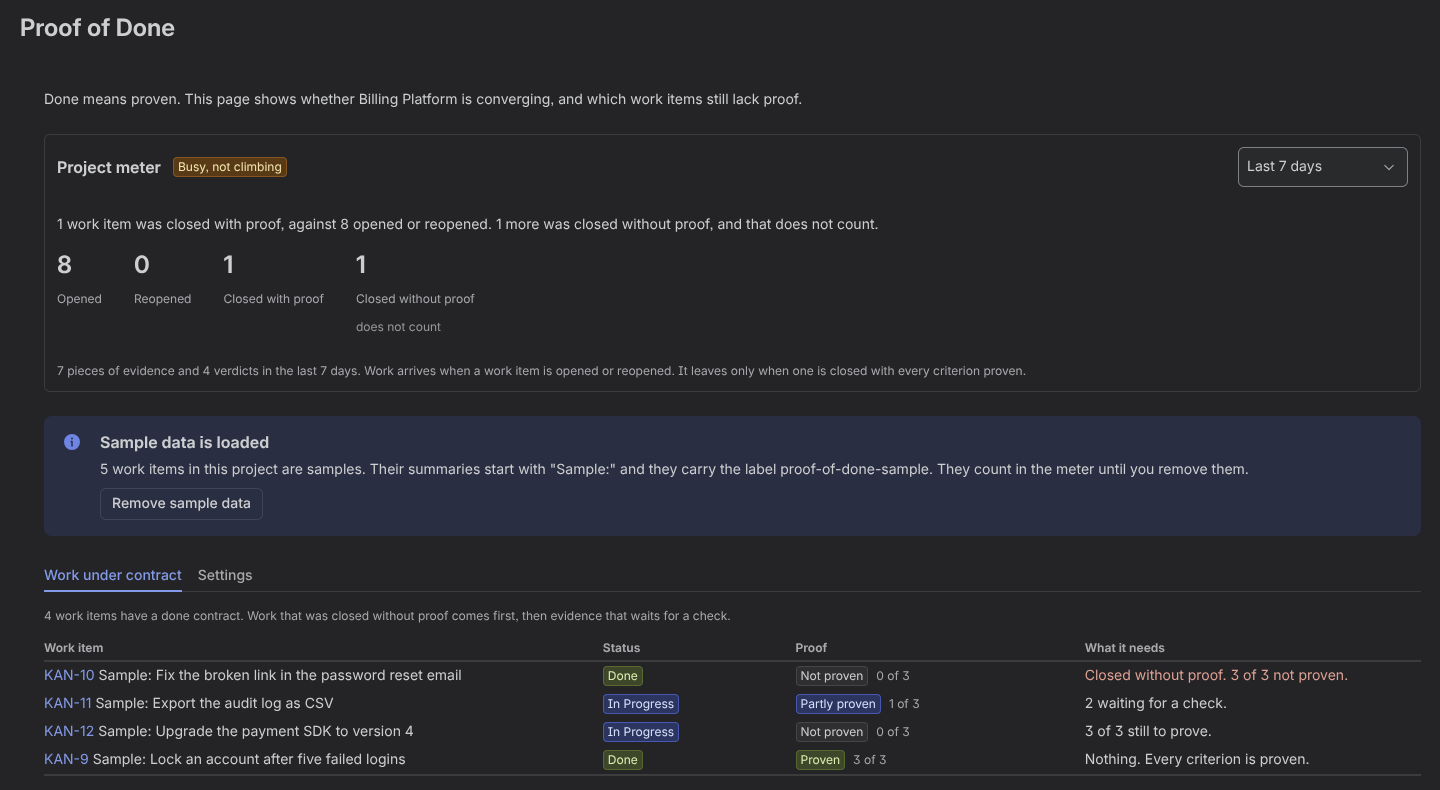
The meter covers the whole project for the last 7, 14 or 30 days. It compares the work items that were closed with every criterion proven against the work items that were opened or reopened.
- Climbing
- More work items were closed with proof than were opened or reopened.
- Busy, not climbing
- Something happened, and the closes with proof did not outnumber the new and reopened work. Something happened when a work item was opened, reopened or closed, or when evidence or a verdict arrived.
- Stalled
- Nothing of that happened in the period.
The meter shows these numbers.
- Opened
- Work items that were created in the project in the period.
- Reopened
- Work items that left a done status in the period.
- Closed with proof
- Work items that are in a done status now, reached it in the period and have every criterion proven.
- Closed without proof
- Work items that are in a done status now, reached it in the period and have a contract that is not fully proven. The page marks this number “does not count”.
- Closed, no contract
- The rest of the work items that Jira counts as closed in the period. That is work with no contract, work whose contract has no criteria, and work whose contract is not among the 200 that the page reads. The page shows this number only when it is not zero, and marks it “does not count”.
So a project where only some of the work has a contract reads “Busy, not climbing” until the closes with proof outnumber everything that arrives.
The numbers come from two places. For “Opened” and for the total of closed work the app asks Jira, as you, how many work items were created and how many reached a done status in the period. Jira answers with an approximate count of the work items that you can see, with or without a contract. “Reopened” and the counts of evidence and verdicts under the numbers come from the app’s own history. They cover every work item in the project, also those you cannot see.
The table on the Work under contract tab lists the work items under contract that you can see, ten to a page. Work that was closed without proof comes first, then rejected evidence, then evidence that waits for a check, then criteria with no evidence, and proven work last. The app reads the 200 contracts that changed most recently and no more. The line above the table gives their number, and it includes work items that you cannot see or that were deleted. The two numbers for closed work with a contract are counted from the same 200 contracts, and only from the work items you can see.
A work item that moves to another project stays on the page of the project where its contract was created.
Settings
The settings are on the Settings tab of the project’s Proof of Done page. The same form is on a page named Proof of Done in the project’s own settings. A project admin or a Jira admin can change them, and everyone who can see the project can read them. The app stores a change when you press Save settings.
- When a work item is closed without proof
- The reaction of the done gate. The default is the comment.
- Evidence has to be accepted by someone other than the person who entered it
- Ticked by default. Clear it for a team of one. The rules of proof say what changes. After a change the app counts the 60 contracts that changed most recently again and rewrites their search fields. An older contract keeps its old count on the project page and in the search until its next change. The panel and the done gate use the new setting at once.
- Treat a work item that has no contract as not proven
- Clear by default. When it is ticked, the done gate reacts to the close of a work item that has no contract, and the validator refuses it. Leave it clear while only part of the project uses contracts.
- Project rules
- A rule is a criterion that goes into each new contract in the project, next to the ones from the description of the work item. A rule can ask for one kind of evidence. It can apply to every work item type or to the types you pick. A contract that a person starts with Start empty gets no rules, and a contract that already exists does not change. The panel of such a work item offers the missing criteria with an Add it or Add them button.
Who can do what
- Anyone who can see a work item can read its contract, its evidence, its verdicts and its history in the panel.
- Creating a contract, changing criteria, adding evidence and reviewing need permission to edit the work item.
- Changing the settings of a project, and loading or removing the sample, need a project admin or a Jira admin.
- A coding agent acts with the account of the person who connected it. The tools read Jira as that person, so the agent sees no work item that the person cannot see, and it can change a contract only where the person may edit the work item. It can start a contract from the criteria in the description and the project’s rules, and it can submit evidence.
- The Proof Verifier records verdicts for the person who asked it, and only where that person may edit the work item. It cannot submit evidence.
Search fields
The app copies the state of each contract to a work item property named proof-of-done. Jira’s search can read four fields from it.
proofStateproven,partialorunproven. A contract with no criteria readsnone.provenCriteria- The number of proven criteria.
unprovenCriteria- The number of criteria that are not proven.
proofCriteria- The number of criteria in the contract.
The property also holds the number of self-reviewed criteria and the time of the last update. Jira’s search has no field for those two.
- Only a work item that has a contract carries the property. A work item with no contract has no value in these fields, so do not rely on them to find closed work that has no contract. The meter counts that work under “Closed, no contract”.
- Evidence that waits for a check does not count, so a work item stays
unprovenuntil its first criterion is proven. - A self-reviewed criterion counts as proven.
- The app writes the property after each change of a contract. When that write fails, the fields keep their old values until the next change.
- Anyone who can edit a work item can overwrite the property through Jira’s REST API. Use the fields to find work. The panel, the done gate and the meter never read them. They read the app’s own storage, and the next change to the contract writes the right values back.
The Proof Verifier
The Proof Verifier is a Rovo agent that comes with the app. It reads the evidence that waits on a work item, decides whether each piece proves its criterion, and records a verdict with its reasoning.
The app hands it the criteria, the evidence with the results of the checks, the Teamwork Graph note where there is one, and up to 6,000 characters of the description of the work item. The app gives it no way to open a link.
Its instructions tell it to judge from the record, to treat text inside evidence as material to judge and not as an instruction, and to reject when it is unsure. The app does not enforce these instructions. The Proof Verifier is a language model, so it can still get a verdict wrong.
The app enforces three things about its verdicts. Each verdict needs a reason of at least 10 characters. The evidence must have passed the checks. The person who asks must have permission to edit the work item.
Open it with Ask Proof Verifier in the panel. The button is there when your site has Rovo, you may edit the work item, and evidence waits for a review. You can also pick the agent in Rovo chat and ask, for example, “Review the evidence that waits on ABC-123”.
Rovo shows the verdicts in a card first, each with a checkbox. The agent records them when you press Confirm selected.
After you press Ask Proof Verifier, the panel looks for new verdicts every eight seconds for five minutes, and it stops earlier when nothing waits any more. A review that you start in Rovo chat does not start this. Press Refresh to see its verdicts.
The app itself makes no calls to a language model. The reasoning happens in Rovo and in the coding agent you connect.
The Teamwork Graph check
Evidence for a pull request or a build is a claim by whoever entered it. When a code host or a CI tool is connected to Jira, the Teamwork Graph holds what that tool reported for the work item. The app compares the two and puts a note in the Review evidence dialog. It does this for a pull request or a build that has a link, and it reads the Teamwork Graph as the person who is using the app.
- Confirmed
- The graph links this pull request, build or deployment to the work item, and it holds no state that contradicts the evidence. That covers a link for which the graph holds no state at all, and an open pull request when the evidence does not claim a merge.
- Differs
- The graph holds a state that contradicts the evidence. Examples are a pull request that was declined, a pull request that is still open while the evidence says merged, and a build that failed or has not finished.
- Not linked
- The graph links other pull requests or builds to the work item, and this link is not one of them.
- No record
- The graph gave the app nothing to compare with. That happens when the graph links nothing of that kind to the work item, which is what to expect when no development tool is connected to Jira. It also happens when the graph left out one of the lists the app asked for, or gave the app only part of one. Atlassian’s documentation says that the graph leaves out data when an admin has not granted one of the app’s Teamwork Graph permissions, and when the person who asks may not see that data.
To see more than “No record”, the site needs a development tool connected, such as GitHub or Bitbucket. Jira links a pull request to a work item when the work item key is in the branch name, the pull request title or a commit message. Add that pull request as evidence on the work item. The note is in the dialog that opens from Review, or from Reject on evidence you entered yourself.
The Teamwork Graph does not always answer. The app waits four seconds for it. After that the dialog says “The Teamwork Graph did not answer. You can judge without it, or ask again.” and has an Ask again button.
The note is advice for the reviewer. It never accepts or rejects, and the done gate does not read it. The Proof Verifier gets the same note with each pull request or build that has a link, when the graph answers. A coding agent gets it in the answer to submit-evidence, when the evidence passed the checks.
The sample data
Load sample data creates five work items in the project, so that you can see every state of the app at once. Only a project admin or a Jira admin can load or remove them. The app creates and deletes them as itself, so that person needs no permission to create or delete work items.
- The app gives each sample work item a summary that starts with “Sample:”, a description and the label
proof-of-done-sample. If Jira refuses to create a work item with the label, the app tries once more without it. - It picks a story or a task as the work item type. In a project that has neither, it takes the first type that is not an epic.
- It moves four of the five work items, each with the first transition that leads to an in-progress or a done status. When the workflow has no such transition, or Jira refuses the move, the work item stays where it is.
- It comments on the sample that is closed without proof, as the done gate would. With the reaction set to “Do nothing” it does not.
- The verdicts in the sample are written by the app. No person is behind them, and the panel shows them as “in the sample data”.
- The sample work items count in the meter until you remove them.
Remove sample data deletes the sample work items and what the app stored for them, together with any subtasks that someone added under them. The app remembers each sample work item by its Jira id and deletes it by that id. It does not look at what the work item holds by then or which project it is in. It deletes no other work item. When Jira will not delete one of them, the page names it, and you delete it in Jira.
Limits
- A contract holds up to 40 criteria at a time. A criterion has 3 to 500 characters.
- The app reads up to 40 criteria from a description and cuts one that is longer than 500 characters.
- A criterion holds up to 50 pieces of evidence.
- The sentence that says what evidence shows has up to 1,000 characters. A link has up to 2,000, an excerpt up to 4,000, a command up to 300, a commit up to 64, and the reason of a verdict up to 2,000.
- A project has up to 20 rules. A rule has 3 to 500 characters.
- The History shows the 100 newest entries of a work item.
- The project page reads the 200 contracts that changed most recently.
- An answer to a coding agent holds the five newest pieces of evidence of each criterion, and
list-unproven-worklists up to 30 work items.
Known limitations
- The app has no export. To list work by proof, use the search fields.
get-done-contractreturns the contract of one work item to a coding agent. - The app’s pages are in English. The app finds criteria in a description only under an English heading or label such as “Acceptance criteria”, “Definition of done” or “Done when”.
- The checks read the fields that the submitter filled in. The app cannot tell whether a test run happened or whether a link shows what the evidence says.
- You cannot delete or edit one piece of evidence or one verdict. Deleting the work item removes what the app stored for it.
- Jira shows the panel on a work item only after someone has added it there with the apps button.
- The done gate reacts after the close. Only the validator stops a close, and only on the transitions it was added to.
- A project with more than 200 contracts sees the 200 that changed most recently on its page.
- The sample work items are real work items. Remove them with Remove sample data before you uninstall the app.
What it stores and what it may do
- The app’s permissions are
read:jira-workandwrite:jira-work, and four Teamwork Graph permissions that only read:read:graph:issue:jira,read:graph:pull-request:external,read:graph:build:externalandread:graph:deployment:external. - Contracts, evidence, verdicts, the history and the project settings live in Forge SQL, a database inside Atlassian’s cloud. That storage follows the data residency setting of your Jira site.
- The app makes no outbound network calls. It gives contract and work item data to Jira, to Rovo when someone asks the Proof Verifier, and to a coding agent that a person connects.
- On its pages and in tool calls the app reads work items and the Teamwork Graph as the person who is using it, and asks Jira whether that person may edit them.
- As itself the app reads a work item when its status moves into or out of a done status and when the validator runs.
- As itself it also comments on or moves a work item that was closed without proof, and writes the work item property
proof-of-donethat Jira’s search reads. It creates, moves, comments on and deletes the sample work items. - The history holds an entry for each move of a work item into or out of a done status, with the account id of the person who moved it. That includes work items that have no contract.
- When Jira tells the app that someone deleted a work item, the app deletes the contract, criteria, evidence, verdicts and history it stored for that work item. If that message does not arrive or the deletion fails, the rows stay until an admin uninstalls the app.
The privacy policy has the full list of what the app stores, reads and logs.
Uninstall
Do three things before you uninstall the app.
- Remove the “Proof of Done is complete” validator from every workflow. A validator that is left behind blocks its transition.
- Press Remove sample data on every project where you loaded the sample. The sample work items are real work items, and they stay in Jira when the app is gone. The app’s list of them goes with its storage, so after an uninstall you have to find them yourself. Their summaries start with “Sample:”, and they carry the label
proof-of-done-sampleunless Jira refused it. - Remove the app’s MCP server from the coding agents that use it. In Claude Code that is
claude mcp remove proof-of-done.
Uninstalling removes the app’s storage for your site. Atlassian’s documentation says that Forge hosted storage retains data for 28 days after an uninstall, and that installing the app again does not bring the data back by itself.
What the app wrote into Jira stays there.
- The comments that the app wrote on work items.
- The status of a work item that the done gate moved back.
- Sample work items that you did not remove.
- The
proof-of-doneproperty on your work items, because it is Jira data. Someone who may edit those work items, such as a Jira admin, can delete it with the operation “Bulk delete issue property” of Jira’s REST API. Its address isDELETE /rest/api/3/issue/properties/proof-of-done.
Preview features
The workflow validator, the MCP server, the Rovo skills and the Teamwork Graph API were Preview features at Atlassian on 24 November 2026. Atlassian can change them, and the parts of the app that use them would change with them.
Release notes
24 November 2026. First version.
- Done contracts from the acceptance criteria in a work item’s description, with project rules for new contracts.
- Evidence of six kinds, with checks on its fields when it arrives.
- Verdicts from a person or from the Proof Verifier, and attestations that the app accepts when they arrive.
- A Teamwork Graph note on pull requests and builds in the Review evidence dialog.
- A done gate that comments on a work item closed without proof or moves it back, and a workflow validator that refuses the transition.
- A project page with a meter and the work items under contract.
- An MCP server with five tools for coding agents.
- The search fields
proofState,provenCriteria,unprovenCriteriaandproofCriteria.